The FIFINE AmpliGame AM8 gives new podcasters a plug-and-play USB microphone while leaving room to move to an XLR interface later.
This fifine usb/xlr dynamic microphone for podcast recording review looks at its voice-focused design, practical controls, and the tradeoffs between its two connection modes.
FIFINE AM8 Microphone Review Summary
The quick verdict
12,000+ ratings
Read Amazon ReviewsFIFINE AmpliGame AM8
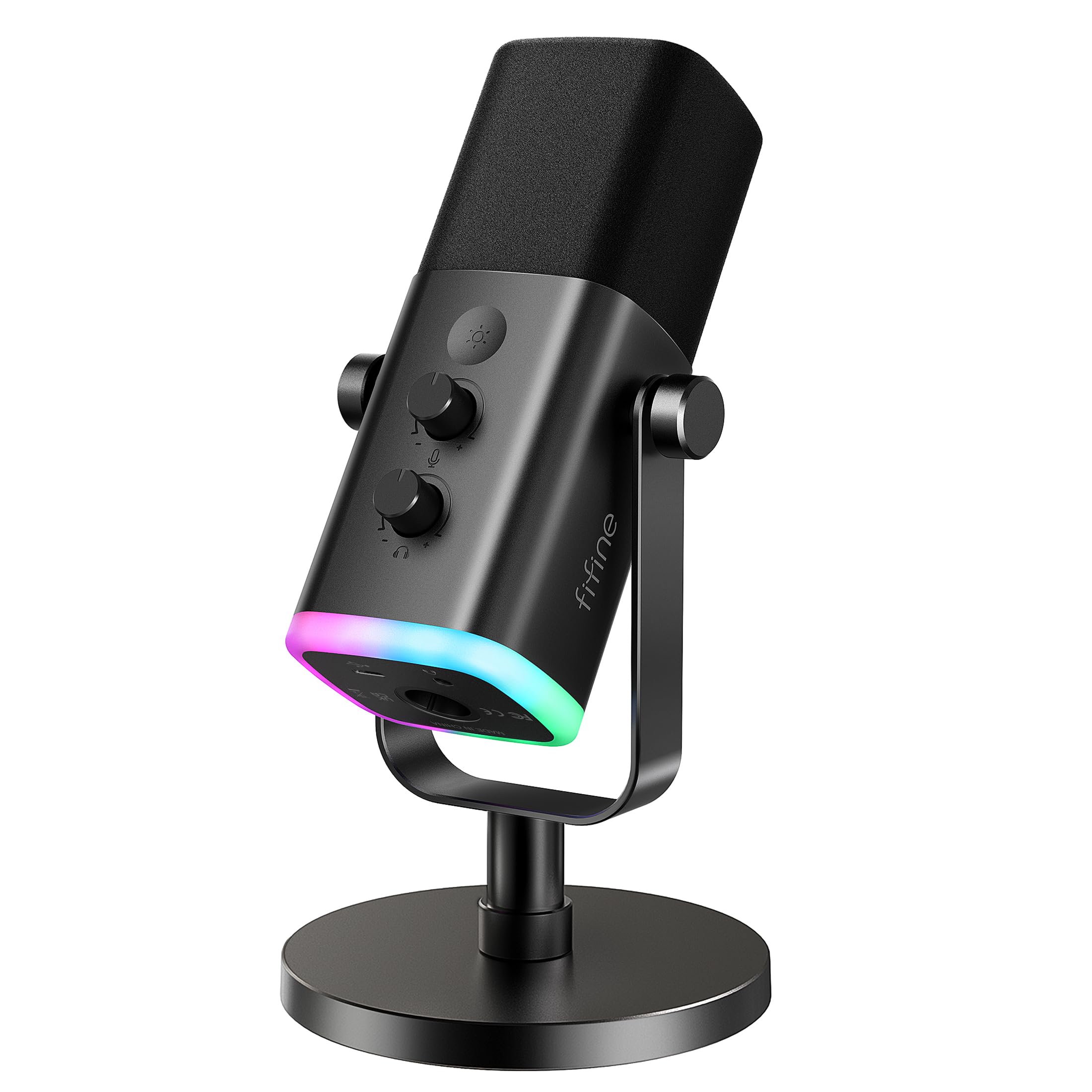
A versatile choice for beginner podcasters and streamers who want simple USB setup, onboard controls, and an XLR upgrade path.
- Dynamic cardioid microphone with a stated frequency response of 50 Hz–16 kHz; the design is intended to favor sound arriving from the front.
- USB and XLR connection options. USB is described as a direct plug-and-play route; XLR requires a separate XLR cable and an audio interface or mixer.
- USB tap-to-mute control with an LED reminder, plus a mic gain knob and headphone jack with monitoring volume control.
- USB-only RGB lighting with three modes, more than ten color options, and a memory function that recalls the selected setting after power-off.

Pros
- USB makes it accessible to creators who want to connect directly to a computer without starting with separate recording hardware.
- The XLR output offers a route to an interface or mixer when a creator wants to build a more configurable setup.
Consider before buying
- The XLR cable is not included, and XLR use also requires an audio interface or mixer.
- RGB lighting and the microphone's function key are inactive when connected over XLR.
Read the full review summary
The AM8 combines a cardioid dynamic capsule, USB and XLR connections, a tap-to-mute control, headphone monitoring, and a desktop stand.
Its design is aimed at spoken audio, streaming, and casual vocal recording, with the USB connection providing the easiest starting point and XLR offering a path into a mixer or audio interface.
It makes the most sense for a solo creator who wants to start with a direct computer connection and may add recording equipment later.
The central compromise is that the onboard RGB lighting and function controls work only over USB; an XLR setup requires a separate cable and interface or mixer, and does not retain those USB-only controls.
The buying factors
FIFINE AM8 Microphone Scorecard
Editorial scores reflect listed features and buyer fit; they are not laboratory measurements or customer ratings.
Connection flexibility
USB offers a direct setup, while XLR can connect through an audio interface or mixer as a creator's setup develops.
Spoken-audio focus
The cardioid dynamic design and stated 50 Hz–16 kHz frequency response are suited to voice-centered recording.
Onboard control
USB mode includes tap-to-mute with an LED reminder, mic gain adjustment, and headphone monitoring volume control.
Setup simplicity
USB is described as plug-and-play, and the included desktop stand supports a straightforward desk setup.
Monitoring utility
A headphone jack and monitoring volume control help creators check their voice while using USB.
Visual customization
USB mode offers three RGB modes and more than ten colors, with a memory function for the selected lighting.
Upgrade flexibility
XLR supports a more configurable recording chain, though the cable and interface or mixer are separate requirements.
Key Features and Specifications of FIFINE AM8 Microphone
- Dynamic cardioid microphone with a stated frequency response of 50 Hz–16 kHz; the design is intended to favor sound arriving from the front.
- USB and XLR connection options. USB is described as a direct plug-and-play route; XLR requires a separate XLR cable and an audio interface or mixer.
- USB tap-to-mute control with an LED reminder, plus a mic gain knob and headphone jack with monitoring volume control.
- USB-only RGB lighting with three modes, more than ten color options, and a memory function that recalls the selected setting after power-off.
- Desktop stand included, with built-in 3/8-inch and 5/8-inch metal threads for compatibility with many microphone stands.
- The microphone is end-addressed; the product guidance suggests keeping its top facing the sound source and recording from about 2 to 6 inches away.
- A windscreen cover is included to help address plosives and nearby electrical hum.
Pros and Cons of FIFINE AM8 Microphone
Pros
- USB makes it accessible to creators who want to connect directly to a computer without starting with separate recording hardware.
- The XLR output offers a route to an interface or mixer when a creator wants to build a more configurable setup.
- Mute, gain, and headphone monitoring controls are available on the microphone in USB mode.
- The desktop stand and common 3/8-inch and 5/8-inch threads give buyers more than one placement option.
Consider before buying
- The XLR cable is not included, and XLR use also requires an audio interface or mixer.
- RGB lighting and the microphone's function key are inactive when connected over XLR.
- The suggested close recording distance and end-addressed pickup mean placement needs attention; check that your desk position lets you speak toward the top of the mic.
Who Should Buy FIFINE AM8 Microphone?
Good fit
Consider the AM8 if you are starting a solo podcast or stream and want a USB microphone with controls within reach.
The tap-to-mute button and LED reminder can be useful during live sessions, while the gain knob and headphone monitoring volume control provide basic adjustments without relying solely on computer settings.
It is also a reasonable fit if you expect your recording setup to change. You can begin over USB, then connect through XLR to an interface or mixer when that becomes useful.
Before choosing the XLR route, account for the separate cable and hardware, and decide whether losing USB-only lighting and controls matters to your workflow.
For a desk-based setup, the included stand offers a ready starting point, while the built-in stand threads offer options for compatible microphone stands.
Check the available space and the mic's suggested close speaking distance before settling on a position.
Who should skip it
Skip this model if you need the RGB and onboard function controls to remain available in an XLR-based setup; those features are specified for USB use only.
Look elsewhere if you need an XLR system without buying a separate cable and interface or mixer, or if your setup cannot accommodate speaking close to an end-addressed microphone.
FIFINE AM8 Microphone: What Its Dual Connection Design Means
USB is the practical starting point
A direct USB connection keeps the first setup comparatively simple for a computer-based podcast or stream.
The included mute, gain, and headphone monitoring controls make the microphone itself part of the operating workflow, while the LED mute reminder gives a visible cue when the mic is silenced.
XLR offers a different workflow
XLR can connect the AM8 to an interface or mixer, which gives a creator another way to build a recording chain.
That route comes with extra equipment needs: the XLR cable is separate, and the USB-specific RGB and function key do not operate over XLR.
Choose the connection based on the controls you expect to use, not just the connector.
Placement matters for close voice recording
The cardioid pattern is intended to emphasize sound from the front and reject off-axis noise, and the guidance suggests a 2-to-6-inch recording range. Since the mic is end-addressed, plan to speak toward its top.
A quick desk-position check can help establish whether that close placement feels comfortable and leaves room for your screen and other gear.
A desk setup with options
The desktop stand supports a simple starting arrangement, and the built-in 3/8-inch and 5/8-inch threads are designed to fit many mic stands.
That gives buyers flexibility in placement, although compatibility with a particular stand should be checked before purchasing. The windscreen cover is another practical inclusion for close spoken recording.
Alternatives to FIFINE AM8 Microphone
Multipurpose Dynamic Microphones alternative
5,000+ ratings
Read Amazon ReviewsSamson Q2U
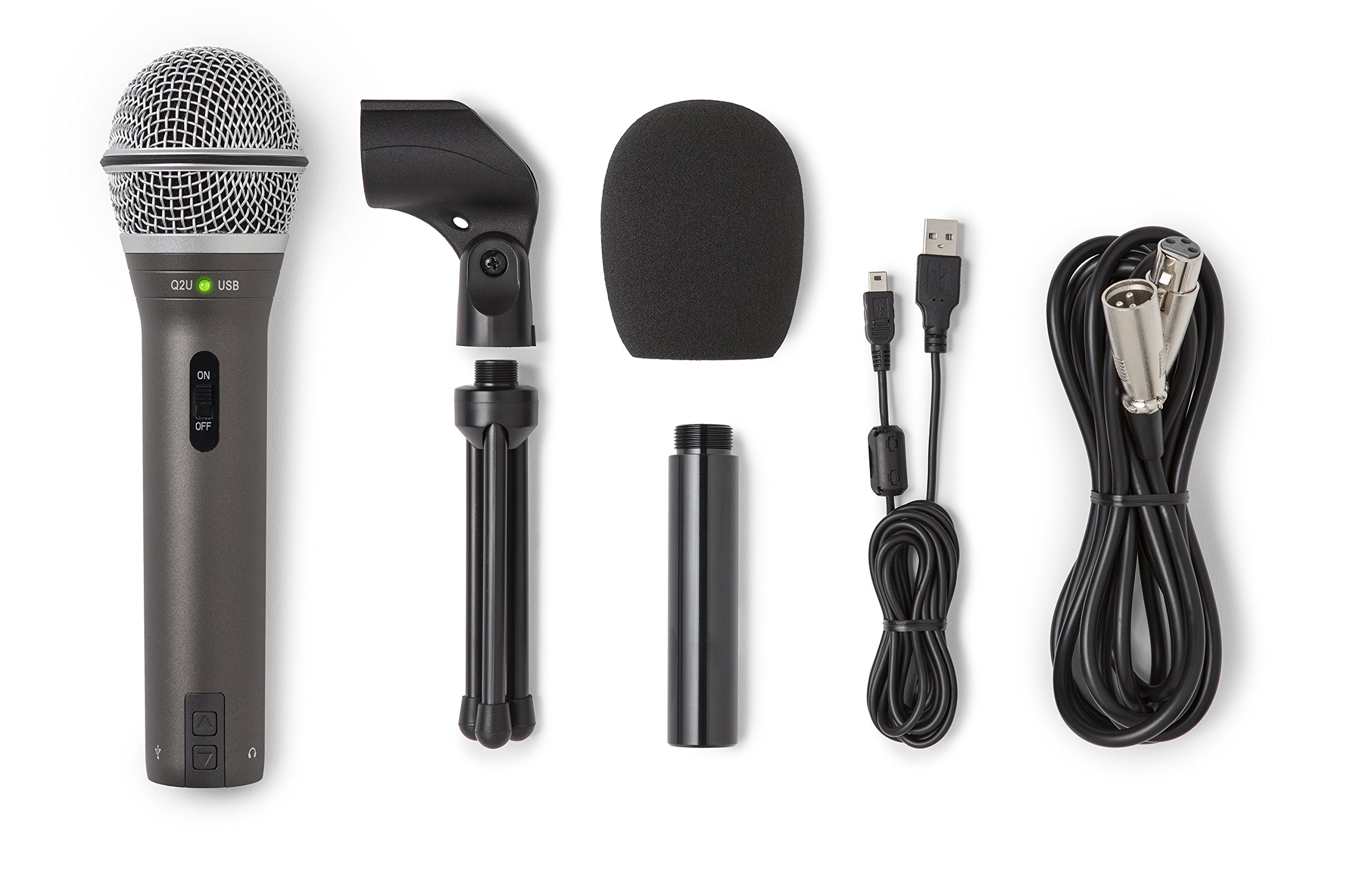
Choose the AM8 if USB-mode RGB and its onboard mute, gain, and monitoring controls suit your desk workflow. Consider the Q2U if you prefer a handheld form and want both connection cables and several setup accessories included.
- The Q2U is a handheld dynamic microphone with USB-C and XLR connections.
- Its listed package includes a tripod desktop stand, extension, mic clip, windscreen, USB-C cable, and XLR cable.
- The AM8 offers USB and XLR connections, USB-only lighting and onboard controls, and an included desktop stand.
Multipurpose Dynamic Microphones alternative
600+ ratings
Read Amazon ReviewsSamson Q9U
The AM8 suits buyers who value its USB lighting and included desktop stand.
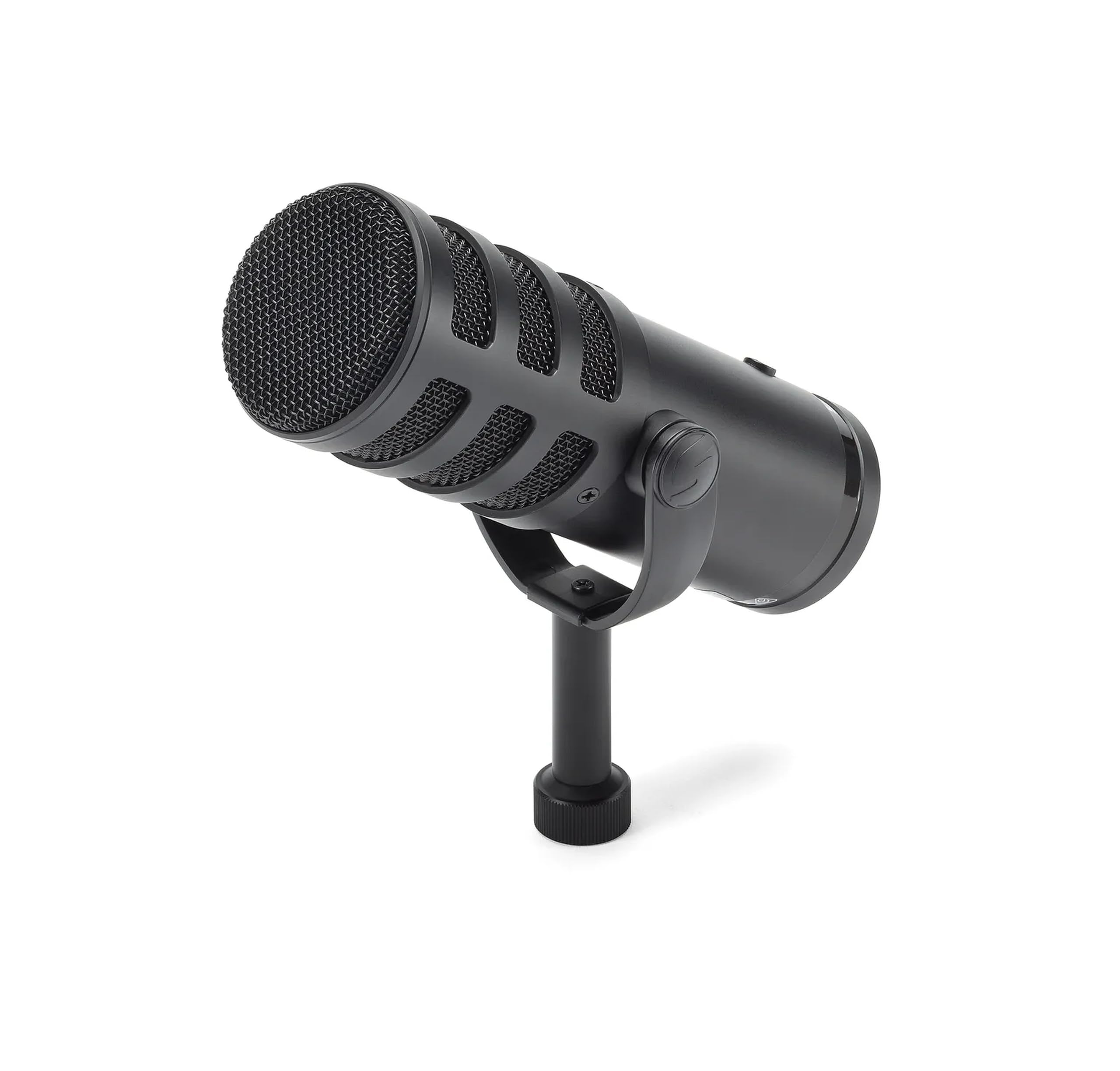
Consider the Q9U if you want mute and headphone monitoring to remain available across USB and XLR connections, along with the listed high-definition USB audio capability.
- The Q9U has USB-C and XLR outputs, zero-latency headphone monitoring, and a mute switch that works with both outputs.
- Its USB-C connection supports 24-bit/96 kHz digital audio, and its description says the dynamic capsule provides output for mixers or interfaces without an external gain device.
- The AM8's USB mode includes RGB, tap-to-mute, gain adjustment, and headphone monitoring; its XLR cable is separate.
Is FIFINE AM8 Microphone Worth It?
The FIFINE AmpliGame AM8 is worth considering for a beginner or solo creator who wants a dynamic mic with a simple USB starting point, useful onboard controls, and the option to add an XLR recording chain later.
Its stand and multiple placement threads also make it practical to consider for a desk-based setup.
Buy it if USB control and a possible future XLR setup match your plans. Before committing, account for the separate XLR cable and interface or mixer, the USB-only lighting and function key, and the suggested close speaking position.
Your review at a glance
12,000+ ratings
Read Amazon ReviewsFIFINE AmpliGame AM8
A versatile choice for beginner podcasters and streamers who want simple USB setup, onboard controls, and an XLR upgrade path.
- Dynamic cardioid microphone with a stated frequency response of 50 Hz–16 kHz; the design is intended to favor sound arriving from the front.
- USB and XLR connection options. USB is described as a direct plug-and-play route; XLR requires a separate XLR cable and an audio interface or mixer.
- USB tap-to-mute control with an LED reminder, plus a mic gain knob and headphone jack with monitoring volume control.
- USB-only RGB lighting with three modes, more than ten color options, and a memory function that recalls the selected setting after power-off.