The SABRENT USB 3.0 Universal Docking Station review centers on the DS-RICA, a desktop dock offering HDMI and DVI displays, gigabit Ethernet, USB ports, and two fast-charging ports.
Its broad selection may suit a fixed workstation, though buyers should check the computer’s operating system and display needs before choosing it.
SABRENT DS-RICA Review Summary
The quick verdict
1,000+ ratings
Read Amazon ReviewsSABRENT DS-RICA USB 3.0 Docking Station
A fit for laptop and tablet users who want wired networking, two display connections, and a mix of USB ports at a desk.
- Supports simultaneous HDMI and DVI displays; no maximum resolution is specified.
- Includes a 10/100/1000 gigabit Ethernet port for wired networking.
- Provides two USB 3.0 ports, with transfer speeds up to 5Gbps, and two USB 2.0 ports, up to 480Mbps.
- USB 1.1 transfer speeds are listed up to 12Mbps.

Pros
- Combines two display connections, wired Ethernet, audio, and USB expansion in one desktop station.
- Offers simultaneous HDMI and DVI display support for compatible setups.
Consider before buying
- The listed macOS 10.13.4 DisplayLink issue makes operating-system and driver compatibility an important check for Mac users.
- No display resolution limit is given, so confirm that it supports the monitors and modes you plan to use.
Read the full review summary
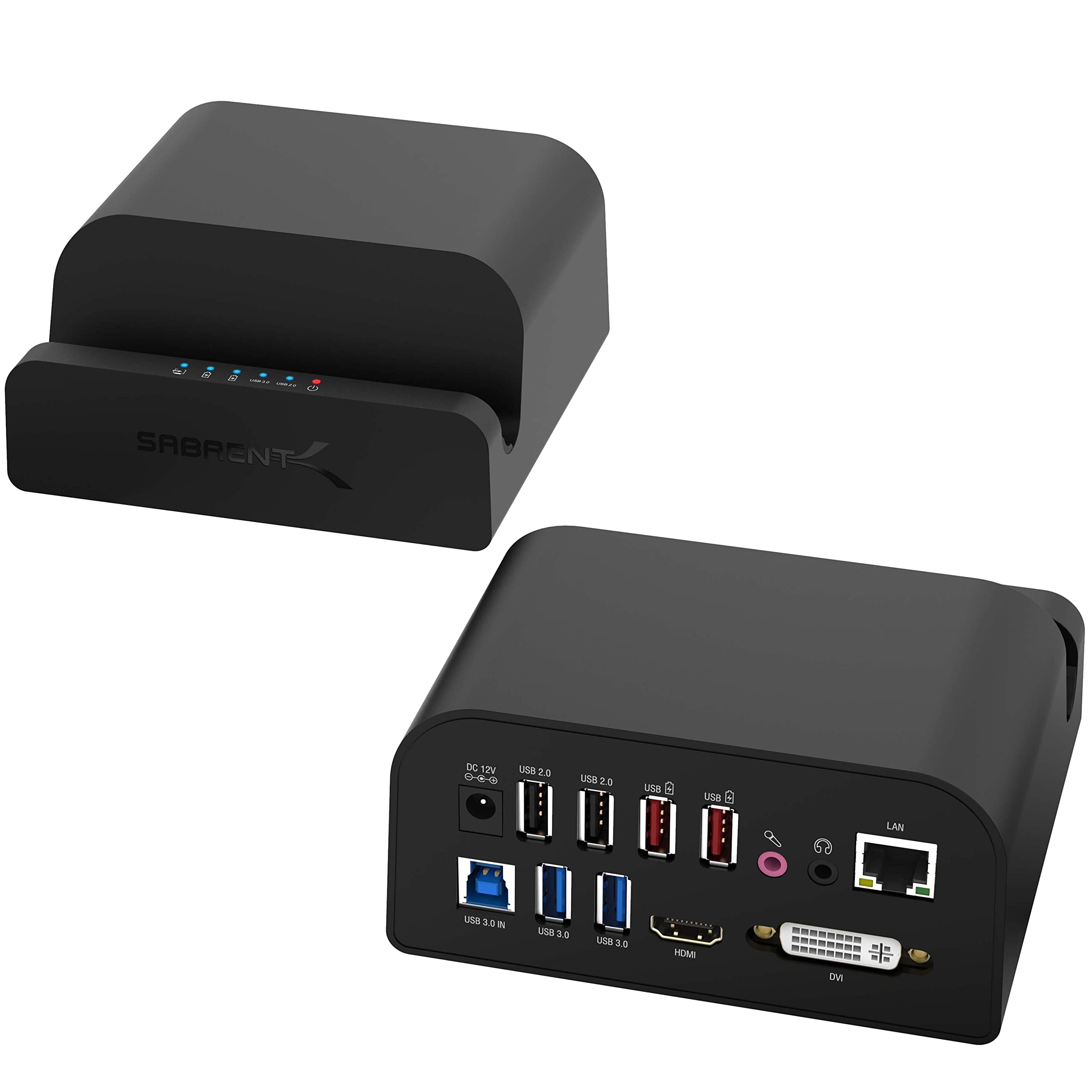
The DS-RICA combines several common desk connections in one station: simultaneous HDMI and DVI displays, a speaker port, microphone jack, four USB data ports, gigabit Ethernet, and two 2.4A charging ports.
That makes it worth considering for someone who wants to connect a range of peripherals and wired networking without relying on a row of separate adapters.
Its tradeoffs are tied to compatibility and its older USB 3.0 design. The product information flags a specific DisplayLink issue with macOS 10.13.4, so Mac owners should confirm current driver and operating-system support for their setup before buying.
It also provides no stated display resolution or USB-C connectivity, making it a less obvious choice for newer, high-resolution or USB-C-first systems.
The buying factors
SABRENT DS-RICA Scorecard
Editorial scores reflect listed features and buyer fit; they are not laboratory measurements or customer ratings.
Connection variety
HDMI, DVI, Ethernet, audio, and four USB data ports cover several desk essentials.
Display flexibility
It supports simultaneous HDMI and DVI displays, but no resolution details are provided.
USB expansion
Two USB 3.0 and two USB 2.0 ports offer a useful mix for peripherals.
Wired networking
The gigabit Ethernet port gives compatible setups a wired networking option.
Device charging
Two 2.4A charging ports are a helpful addition for charging other devices.
Compatibility clarity
A macOS DisplayLink caveat is included, while current operating-system and display details need checking.
Key Features and Specifications of SABRENT DS-RICA
- Supports simultaneous HDMI and DVI displays; no maximum resolution is specified.
- Includes a 10/100/1000 gigabit Ethernet port for wired networking.
- Provides two USB 3.0 ports, with transfer speeds up to 5Gbps, and two USB 2.0 ports, up to 480Mbps.
- USB 1.1 transfer speeds are listed up to 12Mbps.
- Has a speaker port and a microphone jack.
- Includes two 2.4A fast-charging ports for other devices.
- The product information flags a DisplayLink display issue on macOS 10.13.4 and notes that Ethernet and audio functionality, where implemented, are unaffected.
Pros and Cons of SABRENT DS-RICA
Pros
- Combines two display connections, wired Ethernet, audio, and USB expansion in one desktop station.
- Offers simultaneous HDMI and DVI display support for compatible setups.
- Includes two faster USB 3.0 ports alongside two USB 2.0 ports.
- Adds two 2.4A charging ports for devices.
Consider before buying
- The listed macOS 10.13.4 DisplayLink issue makes operating-system and driver compatibility an important check for Mac users.
- No display resolution limit is given, so confirm that it supports the monitors and modes you plan to use.
- The USB 3.0 and USB 2.0 port mix may be a poor fit if your setup depends on newer USB-C connections or faster peripheral ports.
Who Should Buy SABRENT DS-RICA?
Good fit
Consider the DS-RICA if you want a stationary dock that brings together HDMI and DVI displays, wired networking, audio connections, and a mix of USB ports.
It could help simplify a desk where those connections are more useful than a compact travel hub.
Before purchasing, match its display connections to your monitors and check what resolution and number of screens your computer can support through DisplayLink.
Mac users should verify current support for their precise macOS version and driver setup, especially if they use a version affected by the noted display issue.
Who should skip it
Skip it if your laptop requires a USB-C dock, or if your monitors need a specific high resolution that you cannot confirm this station supports.
Also look elsewhere if current Mac DisplayLink compatibility is essential and you cannot verify it for your setup.
How the SABRENT DS-RICA fits a desktop setup
A broad set of desk connections
The combination of HDMI, DVI, gigabit Ethernet, and audio ports gives the DS-RICA a clear desktop focus.
It is most relevant when you already use compatible monitors and wired networking, and want to bring those connections together at the workstation.
The display connection needs a compatibility check
Simultaneous HDMI and DVI support is useful when a workstation uses both connection types.
The supplied details do not state resolution limits, so check the dock’s supported display modes against your computer and monitor requirements before relying on it for a particular screen setup.
USB ports for mixed peripherals
Two USB 3.0 ports provide the fastest listed data connections, while the two USB 2.0 ports can suit less demanding peripherals.
The separate 2.4A charging ports add another use, but check that the number and type of connections align with the devices you expect to keep at your desk.
Mac buyers should verify DisplayLink support
The product information identifies a display problem for systems upgraded to macOS 10.13.4, with Ethernet and audio unaffected where implemented.
Since operating-system and driver support matters to whether a display dock works as intended, Mac buyers should confirm current compatibility before making this their main display connection.
Alternatives to SABRENT DS-RICA
Laptop Docking Stations alternative
1,000+ ratings
Read Amazon ReviewsSABRENT DS-SD6P 6-Port USB-C Dock
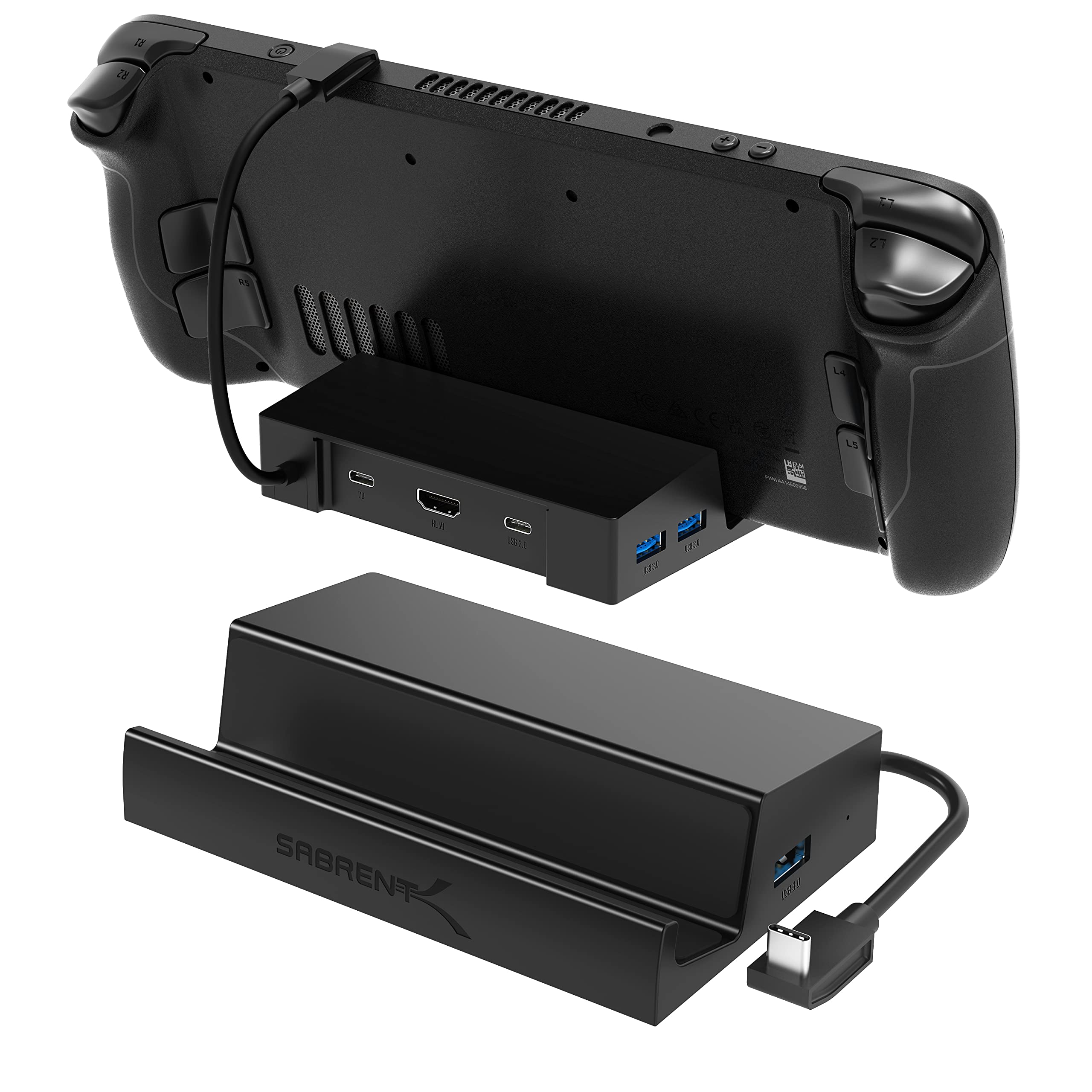
Choose the DS-SD6P if your compatible USB-C device and single HDMI display are central to the setup, and you value compactness and power delivery.
The DS-RICA better matches a desk that needs both HDMI and DVI plus wired Ethernet and audio connections.
- The DS-SD6P is a compact USB-C dock with HDMI output up to 4K at 60Hz on compatible devices, three USB-A ports, one USB-C data port, and up to 95W PD charging.
- It requires DisplayPort Alt Mode for video and does not include Ethernet.
- The DS-RICA offers HDMI and DVI display connections, gigabit Ethernet, audio, four USB data ports, and two 2.4A charging ports.
Laptop Docking Stations alternative
60+ ratings
Read Amazon ReviewsSABRENT DS-T4MF Thunderbolt 4 Docking Station
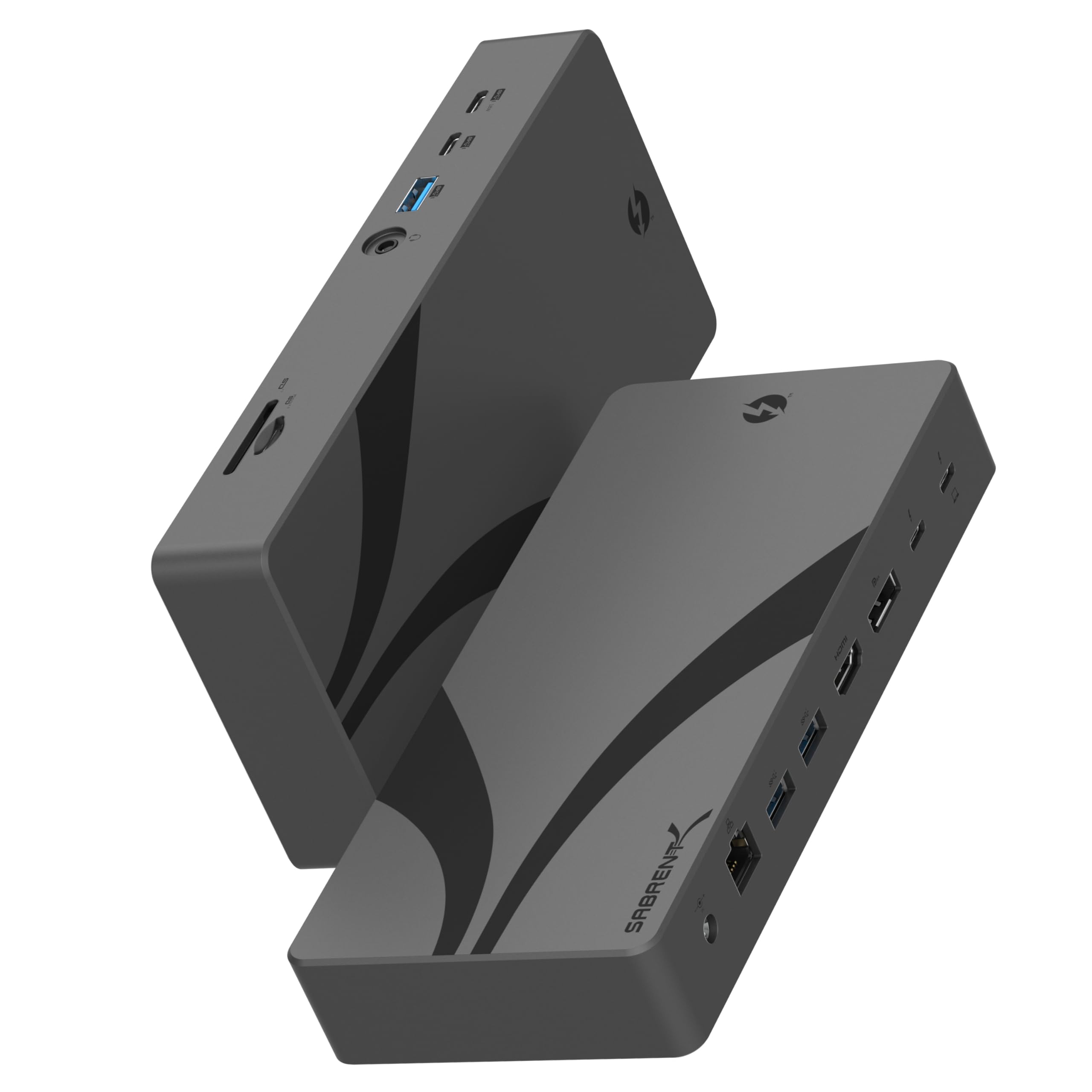
Consider the DS-T4MF if you have a compatible Thunderbolt or USB4 computer and need its newer connection options, card readers, or higher stated display modes.
The DS-RICA may suit a simpler HDMI-and-DVI workstation, while the DS-T4MF’s more advanced connections are useful only if your computer and monitors can use them.
- The DS-T4MF supports Thunderbolt 4, USB4, and Thunderbolt 3 compatibility, with HDMI 2.1, DisplayPort 1.4, gigabit Ethernet, SD and microSD card readers, and multiple USB-C and USB-A ports.
- Its listed display modes include up to 8K output, subject to the specified connections and compatible setup.
- The DS-RICA focuses on HDMI and DVI display connections, gigabit Ethernet, and USB 3.0 and 2.0 expansion.
Is SABRENT DS-RICA Worth It?
The SABRENT DS-RICA is worth considering for a compatible desktop setup that needs HDMI and DVI displays, wired Ethernet, audio connections, and a mix of USB ports.
Its connection variety and separate charging ports give it practical breadth for a workstation.
Buy only after checking display resolution support and computer compatibility, particularly for Mac systems using DisplayLink. If your setup depends on USB-C or newer high-resolution display connections, make sure the dock matches those specific needs before committing.
Your review at a glance
1,000+ ratings
Read Amazon ReviewsSABRENT DS-RICA USB 3.0 Docking Station
A fit for laptop and tablet users who want wired networking, two display connections, and a mix of USB ports at a desk.
- Supports simultaneous HDMI and DVI displays; no maximum resolution is specified.
- Includes a 10/100/1000 gigabit Ethernet port for wired networking.
- Provides two USB 3.0 ports, with transfer speeds up to 5Gbps, and two USB 2.0 ports, up to 480Mbps.
- USB 1.1 transfer speeds are listed up to 12Mbps.