The VIVO Dual LED LCD Monitor Mount review centers on a freestanding stand built for two screens, including ultrawides, with flexible positioning and a broad desk base.
It suits buyers who want a dual-monitor setup without attaching a clamp to the desk, provided they have room for the base and keep the screens balanced over it.
VIVO Dual Mount Review Summary
The quick verdict
16,000+ ratings
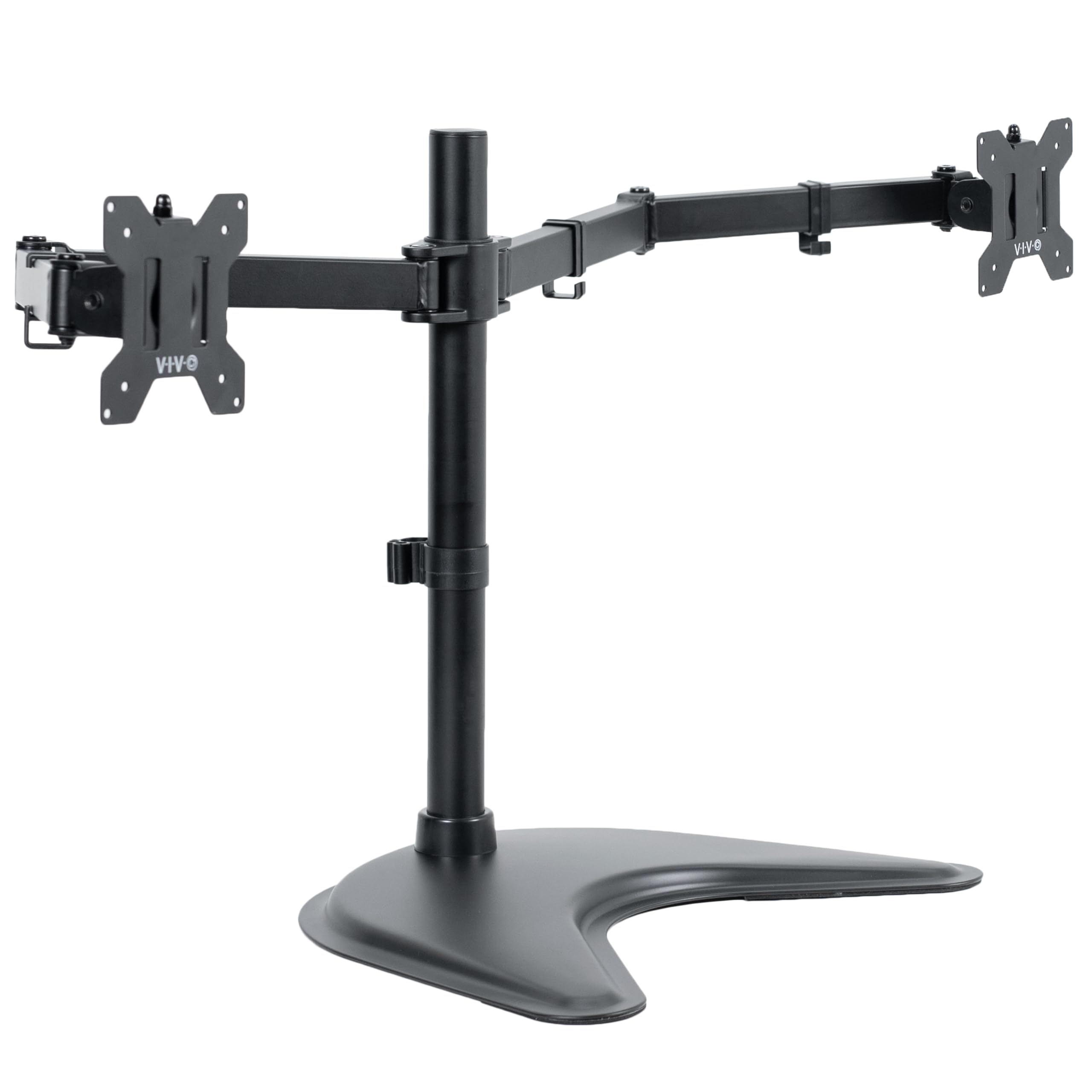
Read Amazon ReviewsVIVO STAND-V038F Dual Monitor Mount
A freestanding dual-screen mount for desk setups with two VESA-compatible monitors, including ultrawides up to 38 inches.
- Supports two monitors sized 13–38 inches, each weighing up to 22 pounds.
- Fits monitors with 75 × 75 mm or 100 × 100 mm backside VESA mounting holes.
- Adjustable arms provide +90° to −90° tilt, 180° swivel, 360° rotation, and height adjustment along the center pole.
- Freestanding base measures 16.3 × 12.8 inches and has padding underneath to help protect the desk surface.

Pros
- Accommodates two large ultrawide screens up to 38 inches, subject to the per-monitor weight and VESA limits.
- Provides several adjustment directions for arranging screens in a shared viewing position.
Consider before buying
- The 16.3 × 12.8-inch base needs a clear footprint on the desk.
- Screen placement is constrained by the base: pulling the monitors far forward or backward can affect stability unless the stand is bolted down.
Read the full review summary
The STAND-V038F holds two 13–38-inch monitors, each weighing up to 22 pounds, when they use 75 × 75 mm or 100 × 100 mm VESA mounting holes.
Its arms tilt, swivel, rotate, and adjust in height along the center pole, offering useful range for lining up screens in a side-by-side workstation.
Its freestanding design avoids a desk-edge clamp, while detachable VESA plates simplify attaching the monitors and cable clips help route power and AV cords.
The substantial 16.3 × 12.8-inch base takes up desk space, and VIVO cautions against pulling the screens far forward or backward unless the stand is bolted down.
Check monitor fit, base clearance, and your preferred screen position before choosing it.
The buying factors
VIVO Dual Mount Scorecard
Editorial scores reflect listed features and buyer fit; they are not laboratory measurements or customer ratings.
Screen compatibility
Supports two 13–38-inch screens up to 22 pounds each with common 75 × 75 mm or 100 × 100 mm VESA patterns.
Positioning range
Offers broad tilt, swivel, and rotation adjustment, plus height adjustment along the center pole.
Freestanding setup
A wide padded base gives buyers a clamp-free mounting option, though it occupies a defined area of the desktop.
Cable organization
Detachable clips on the arms and center pole help keep power and AV cables gathered along the stand.
Installation convenience
Detachable VESA plates and included assembly hardware and instructions should make monitor attachment more manageable.
Placement flexibility
The base suits desks where a freestanding stand is preferred, but monitor positioning needs to stay balanced over it unless bolted down.
Key Features and Specifications of VIVO Dual Mount
- Supports two monitors sized 13–38 inches, each weighing up to 22 pounds.
- Fits monitors with 75 × 75 mm or 100 × 100 mm backside VESA mounting holes.
- Adjustable arms provide +90° to −90° tilt, 180° swivel, 360° rotation, and height adjustment along the center pole.
- Freestanding base measures 16.3 × 12.8 inches and has padding underneath to help protect the desk surface.
- Detachable cable clips attach along the arms and center pole to organize power and AV cords.
- Detachable VESA plates, assembly instructions, hardware, and a three-year warranty are included.
Pros and Cons of VIVO Dual Mount
Pros
- Accommodates two large ultrawide screens up to 38 inches, subject to the per-monitor weight and VESA limits.
- Provides several adjustment directions for arranging screens in a shared viewing position.
- Freestanding design avoids relying on a desk-edge clamp.
- Padded base and detachable cable clips attend to desk contact and cable routing.
Consider before buying
- The 16.3 × 12.8-inch base needs a clear footprint on the desk.
- Screen placement is constrained by the base: pulling the monitors far forward or backward can affect stability unless the stand is bolted down.
- Compatibility depends on each monitor meeting the weight limit and having one of the supported VESA hole patterns.
Who Should Buy VIVO Dual Mount?
Good fit
Choose the VIVO Dual Mount if you need a stand for two screens, want support for monitors up to 38 inches, and prefer a freestanding base over a desk-edge clamp.
Its tilt, swivel, rotation, and pole height adjustment give you several ways to arrange the pair around your viewing position.
Before buying, measure the desk area for the 16.3 × 12.8-inch base, then confirm that each monitor weighs no more than 22 pounds and has compatible VESA holes.
Plan to keep the screens positioned over the base’s center of gravity; if your preferred layout pulls them far forward or backward, check whether bolting the stand down is workable for your setup.
It is a practical fit for workstations where mounting two screens and keeping their cables gathered matter more than keeping every part of the desktop clear.
The included detachable plates and hardware also make the mounting process more approachable than handling a fixed plate behind each screen.
Who should skip it
Skip this stand if you cannot spare a 16.3 × 12.8-inch area for the base or your monitor placement would require pulling screens far forward or backward without bolting the stand down.
Look elsewhere if either monitor exceeds 22 pounds, falls outside the 13–38-inch range, or lacks the supported VESA mounting pattern.
How the VIVO Dual Mount Fits a Two-Screen Desk
A freestanding base shapes the layout
The STAND-V038F places both monitors on a shared freestanding base rather than fastening the stand to the desk edge. That can suit desks where a clamp is not the preferred arrangement, but the base has a meaningful footprint.
Measure the available surface before deciding where the stand and your other desk essentials will go.
Check weight, size, and VESA fit together
The compatibility range covers two monitors between 13 and 38 inches, up to 22 pounds each, with 75 × 75 mm or 100 × 100 mm mounting holes.
Screen size alone does not establish fit: check the monitor’s weight and backside mounting pattern as well, especially when pairing larger or ultrawide screens.
Adjustment helps align a matched pair
Tilt, swivel, and rotation let you change the angle and orientation of each mounted screen, while height adjusts along the center pole. This range can help tailor a dual-screen arrangement to the way you work.
Consider the shape and position of your desk before settling on a layout, since the monitors need to remain balanced over the base unless it is bolted down.
Cable clips keep routing close to the stand
Detachable clips on the arms and center pole provide places to guide power and AV cables.
They can make the run from each screen toward the desk easier to organize; plan cable lengths around the final screen position so movement through the adjustment range remains practical.
Alternatives to VIVO Dual Mount
Computer Monitor Arms alternative
2,000+ ratings
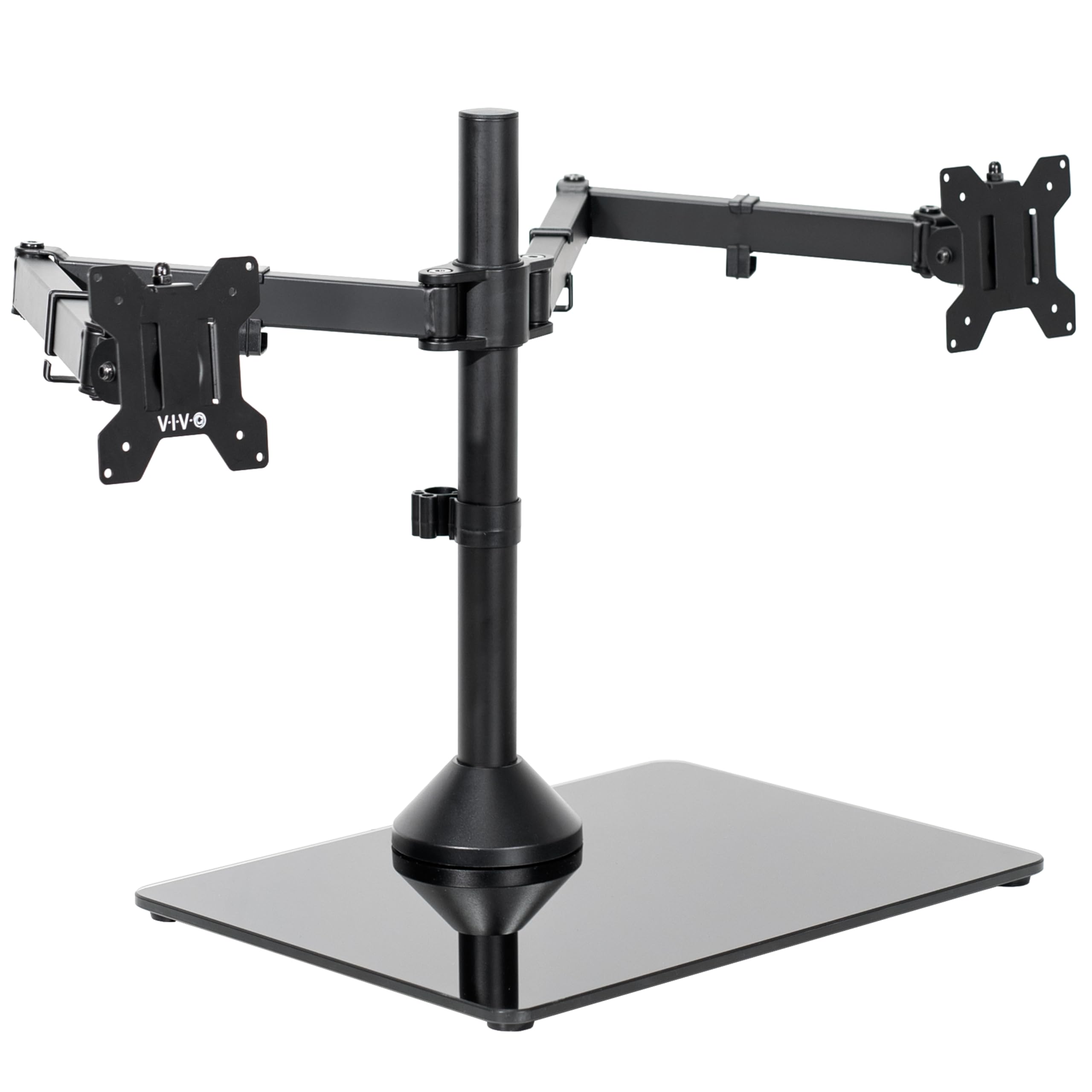
Read Amazon ReviewsVIVO STAND-V038FG Dual Ultrawide Mount
Consider the STAND-V038FG if you want a similar freestanding dual-ultrawide layout and prefer its tempered-glass base design.
Both models call for keeping screens balanced over the base unless bolted down, so compare the base material and footprint against your desk preferences.
- The STAND-V038FG also supports two 13–38-inch screens up to 22 pounds each with 75 × 75 mm or 100 × 100 mm VESA holes.
- Its product description identifies a tempered-glass base measuring 17 × 12.8 inches, padded underneath, with steel pole and arms.
- The STAND-V038F is a freestanding dual mount with a 16.3 × 12.8-inch padded base, supports two screens up to 38 inches and 22 pounds each, and warns against pulling monitors far from the base unless bolted down.
Computer Monitor Arms alternative
60,000+ ratings
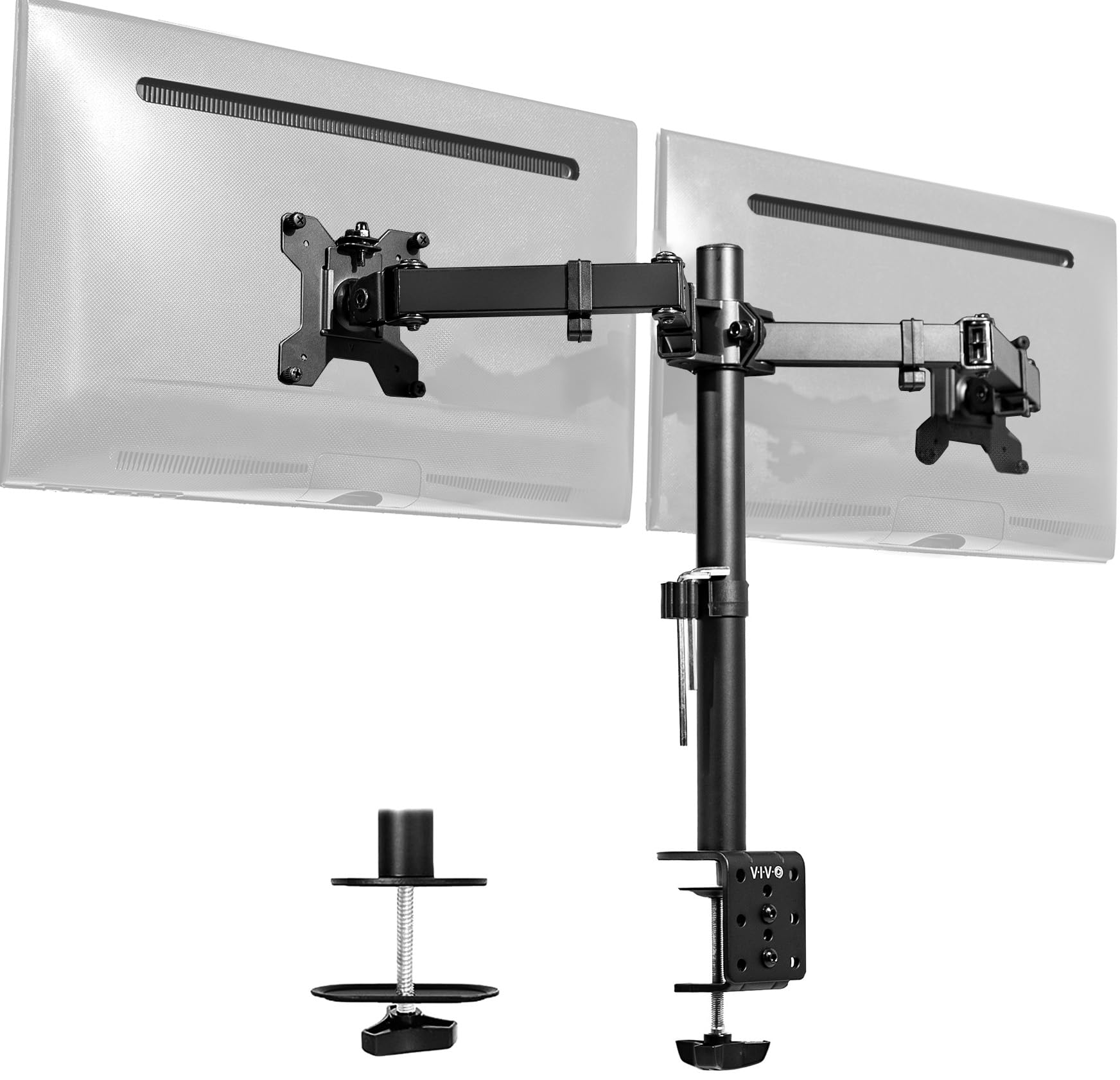
Read Amazon ReviewsVIVO STAND-V002 Dual Monitor Desk Mount
Choose the STAND-V002 if both screens fit its 30-inch maximum and you prefer a desk-mounted clamp or grommet arrangement. The STAND-V038F is the better fit when support for larger screens and a freestanding base are priorities.
- The STAND-V002 supports two 13–30-inch monitors up to 22 pounds each and attaches to the desk with a C-clamp or optional grommet mount.
- It offers tilt, swivel, rotation, pole height adjustment, and cable clips.
- The STAND-V038F is freestanding and supports two monitors up to 38 inches and 22 pounds each, using a 16.3 × 12.8-inch base.
Is VIVO Dual Mount Worth It?
The VIVO STAND-V038F is worth considering for a two-monitor workstation that needs support for screens up to 38 inches and favors a freestanding stand.
It combines broad adjustment, cable clips, and a padded base with a clear footprint requirement.
Measure the desk, check both monitors’ weight and VESA patterns, and plan to keep the screens centered over the base unless you can bolt it down.
If those conditions suit your setup, this mount offers a useful way to organize a large dual-screen arrangement.
Your review at a glance
16,000+ ratings
Read Amazon ReviewsVIVO STAND-V038F Dual Monitor Mount
A freestanding dual-screen mount for desk setups with two VESA-compatible monitors, including ultrawides up to 38 inches.
- Supports two monitors sized 13–38 inches, each weighing up to 22 pounds.
- Fits monitors with 75 × 75 mm or 100 × 100 mm backside VESA mounting holes.
- Adjustable arms provide +90° to −90° tilt, 180° swivel, 360° rotation, and height adjustment along the center pole.
- Freestanding base measures 16.3 × 12.8 inches and has padding underneath to help protect the desk surface.